Show Us Your Skills, Become a Funded Trader and Keep The Profits
Enjoy funded trading, with unlimited profit potential




How Much Capital
Would You Like to Manage
FLEX MAX
FLEX MAX
FLEX MAX
FLEX MAX
FLEX MAX
FLEX MAX
FLEX MAX
FLEX MAX
FLEX MAX

This is what we check
objectives and rules
To become a Funded Trader:
Reach a 6% target. For example, on a $50,000 buying power account, the profit target is $3,000
Max Drawdown:
The maximum amount of $ you can lose. Reaching that number will cause termination of the account
End of Day
10 minutes before the end of the day we will fully liquidate your account (open positions and pending orders). We've got you covered!
To become a Funded Trader:
On both the FLEX and MAX Swing accounts, you must reach a profit target equal to 15% of your account's buying power. Example: If your account has a $10,000 buying power, your profit target is $1,500. Once you hit this target within the evaluation period and stay within all risk and consistency rules, you become eligible for a funded trading account.
Max Drawdown:
The Max Drawdown is the maximum dollar amount you are allowed to lose during the evaluation. Reaching or exceeding this limit will result in termination of the account. For both FLEX and MAX Swing accounts, the Max Drawdown is 7% of the account's buying power. Example: If your account has a $10,000 buying power, your Max Drawdown limit is $700. Staying within this limit is essential to remain in the program and progress toward becoming a funded trader.
No Earnings Holding:
We will disable a ticker at the end of the trading day - before the earnings are released.
Consistency Rules:
Minimum positions = 20 The trader’s best position can not be responsible for more than 30% of the total profit target. Example: on a $3,000 profit target, the best profitable position can not be more than $900
Trading Period:
60 calendar days, during them you can day trade or hold your positions overnight and over the weekend (including pre/after market hours)
What can I trade
Almost any stock and ETF in the U.S. markets ⚠️ Note: We do not offer trading in index futures like NQ or ES but you can trade their ETFs, such as QQQ, SPY.
Consistency Rules:
The trader’s best position can not be responsible for more than 50% of the total profit target. Example: on a $3,000 profit target, the best profitable position can not be more than $1,500
Trading Period:
Unlimited time to pass the evaluation and funded phase. You can trade pre-market, open a position after-market and hold it for the next day with no limits (excluding on earnings).
What can I trade
Almost any stock and ETF in the U.S. markets ⚠️ Note: We do not offer trading in index futures like NQ or ES but you can trade their ETFs, such as QQQ, SPY.
Consistency Rules:
To qualify for a funded account, traders must meet the following consistency requirements during the evaluation phase: Minimum of 5 Positions: You must open and close at least 5 separate positions during the evaluation. Profit Distribution Limits: Your best trade cannot account for more than 30% of the total profit target. Example: If your profit target is $1,500: Your best trade must not exceed $450.
What Can I Trade?
At Trade The Pool, you can trade almost any stock or ETF listed on the U.S. markets. This includes access to over 12,000 U.S.-listed stocks and ETFs, providing a wide range of opportunities and strategies for swing traders. ⚠️ Note: We do not offer trading in index futures like NQ or ES but you can trade their ETFs, such as QQQ, SPY. All trading is done through spot trading - meaning you are trading actual stock and ETF prices, not derivatives or leveraged instruments.
Trading Period
You have 100 trading days to complete the evaluation. Within this period, you can day trade or hold positions overnight and over the weekend, including pre-market and after-hours sessions.
Consistency Rules:
To qualify for a funded account, traders must meet the following consistency requirements during the evaluation phase: Minimum of 5 Positions: You must open and close at least 5 separate positions during the evaluation. Profit Distribution Limits: Your single best trade cannot account for more than 50% of your total profit target. Example: If your profit target is $1,500: Your best trade must not exceed $750.
What Can I Trade?
At Trade The Pool, you can trade almost any stock or ETF listed on the U.S. markets. This includes access to over 12,000 U.S.-listed stocks and ETFs, providing a wide range of opportunities and strategies for swing traders. ⚠️ Note: We do not offer trading in index futures like NQ or ES but you can trade their ETFs, such as QQQ, SPY. All trading is done through spot trading - meaning you are trading actual stock and ETF prices, not derivatives or leveraged instruments.
Trading Period
There is no time limit to complete the evaluation—you can trade at your own pace. Like the MAX account, overnight, weekend, pre-market, and after-hours trading is fully allowed.
Here are some helpful tips to help you pass
the evaluation fast:
3 easy steps



Say No More!
Stop dealing with common traders’ challenges.

ttp funded Trader vs retail trader
|
Comparing costs, fees and services
|
TTP Funded Trader
|
Retail Trader
|
|---|---|---|
|
Open a stock trading account
|
Pay $300, risk $2100
|
$2100 of your own risk
|
|
Buying power
|
More than 100 times
|
Up to 4 times
|
|
Scaling your trading account
|
Withdraw profits and get more daily loss allowance
|
Withdraw, less capital to trade with
|
|
Trading analysis subscription
|
Included
|
$50 - $20 (monthly)
|
|
Coaching 1 on 1
|
Included
|
$150 - $500
|
|
Performance statistics platform
|
Included
|
$20 - $60 (monthly)
|
|
Guidance, Support, Advisors, Mentors
|
Included
|
$50 - $200 (monthly)
|
FAQs
Are there any overnight holding rules?
Ten minutes before the market closes each day (15:50 ET), all active and pending orders will be automatically liquidated.
After the market closes at 16:00 ET, you are allowed to open new positions. These positions may be held overnight until 15:50 ET the next trading day; by then, all active and pending orders will again be liquidated.
When trading during the overnight session, your competition account is not subject to overnight buying power restrictions.
How to create your competition account
Inside the HUB, click: New Order → DAY → Select Competition Account
Where is my competition account

Make sure to click the competition filter under my programs to reveal your TWC 2026 account.
Day Trading:
For Day Trading accounts, you will scale once you reach a 6% validated profit target based on the initial balance of that specific account.
Example: With a $5,000 account, reaching $300 in validated profit qualifies you to move to the next level.
Swing Trading:
For Swing Trading accounts, you will scale once you reach a 15% validated profit target based on the initial balance of that specific account.
Example: With a $10,000 account, reaching $1,500 in validated profit qualifies you to move to the next level.
For more information, learn more about the evaluation process.
Both Day & Swing Trading:
Once you’re funded, your account will be scaled once you’ve reached a 10% validated profit target based on your account’s buying power.
Example: With a $50,000 funded account, reaching $5,000 in validated profit qualifies you to move to the next level.
This process repeats every time you hit a new 10% valid profit milestone in a funded account.
Please note:
For funded FLEX programs, to be eligible for scaling, you must achieve at least 3 profitable days, each with a gain of 0.5% or more. This requirement ensures that traders demonstrate consistent profitability before advancing to a larger buying power.
For more information, explore scaling your funded account.
Yes! Once you’ve hit the target for an evaluation or funded account, your current account will be disabled. After a thorough review of your account, you’ll receive a notification about your new account with a new account ID.
This process can take up to 3 business days.
For more information, visit the program terms.
Day Trading:
Ten minutes before the market closes each day (15:50 ET), all active and pending orders will be automatically liquidated.
After the market closes at 16:00 ET, you are allowed to open new positions. These positions may be held overnight until 15:50 ET the next trading day; by then all active and pending orders will again be liquidated.
When trading during the overnight session, your available exposure is reduced to the overnight buying power listed below.
Overnight Buying Power
People with a $5,000 account will be reduced to an exposure of → $800
People with a $25,000 account will be reduced to an exposure of → $4,000
People with a $50,000 account will be reduced to an exposure of → $8,000
People with a $100,000 account will be reduced to an exposure of → $16,000
People with a $200,000 account will be reduced to an exposure of → $32,000
Swing Trading:
You may hold positions overnight and over weekends in all tiers.
Unlike day trading accounts, your exposure during Pre/Post market hour sessions will remain the same as your full account size.
Copy trading is allowed at Trade The Pool, provided it is used to manage your own trading strategy across a maximum of two accounts and follows the rules below.
Requirements:
- You may copy trades between a maximum of two accounts only.
- All trades must be executed directly by the trader. The use of any external or automated third-party copying tools/software is strictly prohibited.
To ensure balanced risk, accounts must be paired according to the following size requirements:
- MAX/FLEX day-trading
- $5k
- $25k
- $50k (Can be paired only with one $25k or one $5k.)
- MAX/FLEX swing
- $2k
- $10k
Manual Copy Trading: Allowed for evaluation and funded accounts
TraderEvolution, Copy Trading Feature:
The rules for the TraderEvolution copy trading feature follow the same guidelines. However, this platform feature is permitted only on evaluation accounts and is not allowed on funded accounts.
Take Profit or Stop Loss orders will not be automatically created for the follower accounts.
For more information about copy trading, please refer to the Program Terms.
For both Day and Swing trading, you can trade after the regular market closes at 4:00 pm ET and continue until it opens the next trading day, in accordance with the rules of the off-market program.
Trade The Pool provides 24/5 trading, with active sessions beginning on Monday at 3:00 am ET and continuing through the end of post market on Friday at 8:00 pm ET.
Trading hours:
- Regular market: 9:30 AM – 4:00 PM ET
- Overnight session: 4:00 PM – 9:30 AM ET
- No trading over the weekend (Friday 8:00 pm ET – Monday 3:00 am ET)
During U.S. holidays, trading sessions are closed. Sessions end at 8:00 PM ET the day before the holiday when the NYC Stock Market closes and resume at 3:00 AM ET the day after the holiday.
For more information on the program terms regarding off market trading please check out our Program Terms and the FAQs.
The Hub dashboard rounds prices to two decimals for display, which can make a move appear to be “.10” even when the weighted average is slightly less. Our backend calculations use the exact decimals when checking eligibility.
The calculation uses precise weighted average entry and exit prices, then takes the difference between those two averages. Which if calculated precisely and to many decimal points (e.g., 0.0000, can be slightly less than 10 cents).
The Hub dashboard rounds time to the nearest second for display, which can make a move appear to be 30 seconds even when the precise difference is slightly less. Our system uses the exact time in split seconds when checking validity, measured down to milliseconds, microseconds, etc.
The system calculates the precise average entry and exit timestamps, then measures the difference between them in split seconds. If the exact difference is slightly under 30, even if it shows “30 seconds” on the dashboard, the trade may be invalidated according to the 30-second rule.
The volume of any opening trades (opening or adding to a position) must not exceed 5% of the trading volume in the previous one-minute candle for that instrument.
Enforcement: Any trades in an instrument that violate this rule, whether through a single oversized order or multiple smaller orders intended to bypass the limit, may be invalidated and could result in additional restrictions or account review.
What happens if there is no volume in the previous minute? If the prior minute has no trades, we use the most recent 1-minute candle with volume.
During both swing trading and day trading, the rules for order types in pre-market and post-market hours are the same: There are two separate parts to extended hour sessions:
-
- Overnight Execution Off (Trades executed via Nasdaq)
Standard pre-market and post-market hours. These follow the regular exchange schedules (such as NYSE and Nasdaq). During these times, only limit type orders can be executed.The following Orders may be used:- Buy Limit, Sell Limit, Stop Limit, Take-Profit (TP)
- Overnight Execution Off (Trades executed via Nasdaq)

The following Orders may not be used:
-
- Market, Stop, Stop-Loss (SL)
- Overnight Execution On (Trades executed via Blue Ocean)
Trade The Pool offers extended 24/5 trading via Blue Ocean.
The following Orders may be used:- Market, Stop, Stop-Loss (SL), Buy Limit, Sell Limit, Stop Limit, Take-Profit (TP)
Blue Ocean is an alternative trading system (ATS) that allows investors to trade U.S. stocks during overnight hours when traditional exchanges are closed. It operates from 8:00 PM to 4:00 AM ET, providing a 24-hour trading cycle that helps global investors react to news and manage risk in real-time.
Note: Blue Ocean is a separate trading venue from exchanges like Nasdaq or the NYSE. Not every stock is available for overnight trading; only a specific subset stocks and ETFs are supported, and liquidity may be lower than during regular market hours.
For more information on how to disable and enable Blue Ocean please refer to section TTP & Trading Platform: question “Can I completely disable trading during off-market hours?”
Trading hours:
-
- Regular market: 9:30 AM – 4:00 PM ET
- Overnight session: 4:00 PM – 9:30 AM ET
Yes, your trade will be liquidated at 3:50 PM ET if there is a scheduled earnings report that night. This applies to both day trading and swing trading accounts.
Yes, during the overnight session you are allowed to trade on news that occurs before the market opens the next day at 9:30 AM ET.
Example: If significant news breaks overnight, you may place a trade during the overnight session before the market reopens the following day.
Note: This does not include trading during scheduled earnings reports. According to our program terms, you may not open trades on the night of an earnings report. For more details on earnings restrictions, please review our Program Terms.
Consistency rules exist to ensure that traders demonstrate disciplined, repeatable trading rather than relying on luck or taking excessive risks.
The Daily Loss Pause is always calculated at the start of the trading day. This value remains fixed for the duration of that trading day, regardless of any intraday changes to your Max Loss.
Even if the Max Loss level is adjusted intraday (for example, after reaching 3 × Daily Loss in unrealized or realized profit), the Daily Loss Pause does not recalculate until the start of the next trading day.
This means that while the Max Loss may move during the day, the Daily Loss Pause will continue to reflect the starting-day balance and will only update at the market open of the following trading day.
Example Scenario:
Suppose you are trading an account with a starting balance of $50,000.
- At the start of the day, the Daily Pause is set at $49,500 (starting balance minus the $500 daily loss).
- During the day, your account grows to $51,000. Because your profit exceeded 3 × Daily Loss ($1,500), the system resets your Max Loss to your initial balance of $50,000.
- If your equity then falls back to the initial balance of $50,000, the account is disabled for hitting Max Loss.
- In this scenario, you will notice that the Daily Pause was not triggered even though the account was disabled, because the Daily Pause always references the starting-day balance and does not update mid-day. It will only recalibrate again at the beginning of the next trading day.
You can request a withdrawal or payout from your funded account 14 days after the account’s inception date or after a previous withdrawal, provided you have a minimum of $300 in profits (For $5K accounts, the minimum profit withdrawal is $150).
Note: This policy applies to all funded account types and levels. For example, if you scale from a Level 1 funded account to Level 2, you will need to wait an additional 14 days to withdraw profits that were carried over from your previous account. This is because, once you scale, the prior account is disabled and no longer accessible.
To avoid this delay, we recommend requesting a withdrawal before reaching your target and scaling to the next level. This ensures you can access your profits without having to wait an additional 14 days after scaling.
Payouts are processed via wire transfer, cryptocurrency, Hub credits, or credit card, and usually take 3 to 5 business days, depending on your bank, card issuer, country or selected payout method.
The minimum trade requirement depends on the account type:
– MAX/FLEX Swing accounts — Minimum 5 trades required.
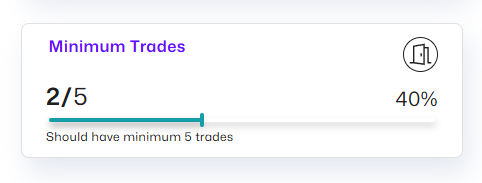
– FLEX Day Trading accounts — Minimum 10 trades required.
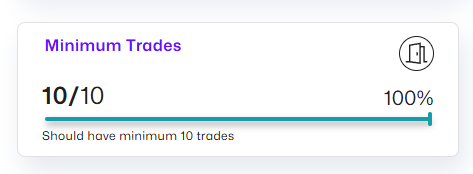
– MAX Day Trading accounts — Minimum 20 trades required.
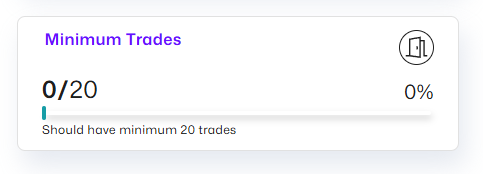
These minimum trade requirements must be met to be eligible for a scale-up and/or payout request. For more information, check out the program terms page.
Yes! When your funded account is scaled to the next level, your buying power increases by 5%, giving you more flexibility to trade.
For more information, learn about scaling your funded account.
Yes! When your funded account is scaled to the next level, your Daily Pause increases by 10%, giving you more flexibility.
For more information about the Daily Pause, view Daily Loss Limit.
To be eligible to withdraw profits from your FLEX account, you must consistently earn at least 0.5% of your buying power in profit on 3 separate trading days within any 14-day period.
These days do not need to be consecutive.
Example: With a $10,000 account
0.5% of $10,000 = $50
So, you’ll need to make at least $50 profit on 3 different days within a 14 day trading period to qualify for a withdrawal.
This rule is to encourage consistent performance over time before you can withdraw profits.
This requirement doesn’t apply to MAX accounts.
Only one booster is allowed per user (not per purchased account). This means that if you have multiple accounts open at the same time, you can only use a booster on one account.
If all of your accounts are terminated and you purchase a new account, you may request a booster for the new account.
Exception:
The SignalStack booster is an exception which can be used as a secondary booster.
All other boosters (Trendspider, TraderSync, Bookmap, Trade The Pool integrations, etc.) follow the one-per-user rule.
Account boosters are optional tools you can activate on your account to enhance your trading workflow. These boosters give you access to premium third-party platforms at no extra cost for a month. They are designed to help with charting, analytics, trade management, automation, market scanning, or real-time order flow.
We partner with several well-known trading platforms so you can use their services for free:
- TraderSync: A trade journaling and performance-tracking platform that helps you analyze your trading habits, stats, and long-term performance.
- TraderVue: A trade journal and analytics tool focused on detailed reporting, tagging, and trade reviews.
- Stock Traders Daily: Provides trading strategies, market analysis, and research tools designed to help traders make informed decisions.
- Trade Ideas: A powerful market scanner that generates real-time trade ideas and alerts using advanced scanning technology.
- SignalStack: A tool that turns alerts from platforms like TrendSpider or TradingView into automated orders routed directly to your broker.
- TrendSpider: A charting and technical analysis platform with automated trendlines, smart alerts, backtesting, and multi-timeframe analysis.
- Bookmap: A deep order flow and liquidity visualization tool that lets you see heatmaps, market depth, and real-time order activity.
You are able to trade more than 12,000 different stocks and ETFs, including penny stocks and IPOs.
During the overnight session, market data is provided by Blue Ocean, giving traders access to real time trading across more than 3,500 stocks, ETFs, penny stocks, and IPOs.
Note: During overnight sessions, due to lower market volume, it’s recommended to avoid low-volume stocks. Trading highly liquid stocks increases the likelihood that your orders will be executed during this time.
No, you can’t completely disable trading during off-market hours.
You can disable Blue Ocean (Overnight Execution) in the platform:
- In the Trader Evolution order entry tool, toggle off “Overnight Execution”
- Or set it as default in your platform settings
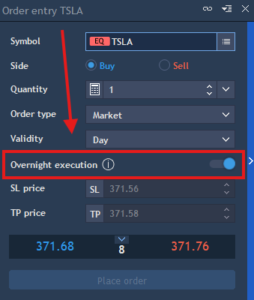
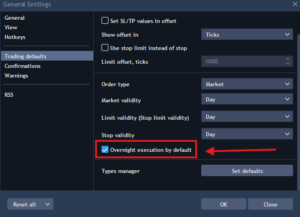
When Overnight Execution is turned off:
- You will still be able to trade during pre/post-market hours
- However, only limit orders will be executed
- Other order types will not trigger during these times
Important:
Disabling this feature does not fully prevent trading outside regular market hours. It only limits execution to pre/post-market conditions (limit orders only) rather than allowing full 24/5 trading. So if you wish to only trade during market hours it helps not to set limit orders with this feature off.
If the toggle is turned on, you can place all order types during off-market hours, but only on Blue Ocean supported instruments.
With a Trade The Pool account, it’s as easy as a click of a button. There is no extra locate fee for “Hard to Borrow”!
Evaluation accounts:
Evaluation accounts will be conducted on a simulated account (paper money) but will reflect real market conditions with a real-time data feed.
Yes. During overnight sessions, you receive a dedicated real-time data feed from Blue Ocean, giving you live price action, market depth, and trade prints specifically for this session.
No, we currently do not offer trading in contracts or options. Our platform supports equities (including ETFs) trading only.
Yes, we offer a free demo for both Swing and Day Trading accounts, allowing you to explore our charts, symbols, and other features before starting an evaluation.
To start your demo, follow these steps:
- Go to https://tradethepool.com/.
- Click on ‘Sign Up’ to create a free account.
- After logging in, click on the ‘New Order’ button.

- Choose which type of account you want, Day or Swing trading.
- Choose the ‘Demo Account’ option to begin your trial.
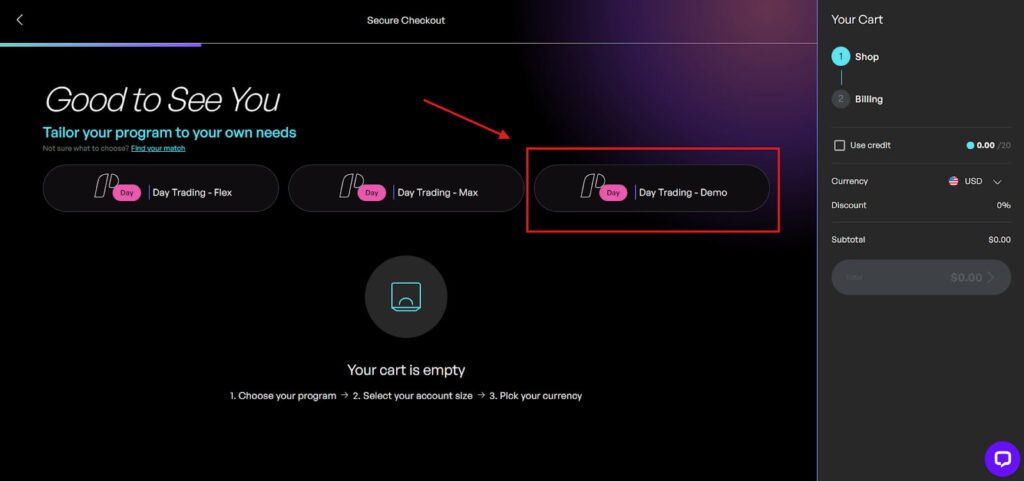
You will be trading on the Trader Evolution platform. It is a third-party, professional-grade platform tailored for Trade The Pool traders.
The TTP Hub reflects your account progress, including invalidation of trades when applicable, while the trading platform does not. This is the reason you may see different balances between the two systems.
For more information, visit the program terms.
Yes and No.
Currently, our trading desktop platform (Trader Evolution) does not support Apple Mac computers, including iPad MacBook Air, MacBook Pro, iMac, Mac mini, Mac Studio, and Mac Pro. On these devices, you can only access the platform through the web terminal.
However, our trading platform (Trader Evolution) does support iOS devices. You can download and use the Trade The Pool App on iPhone and iPod for trading on the go.
Yes, there are some key differences between the mobile app and the PC software.
The PC platform offers a full-featured trading experience with a larger screen, more advanced tools, and greater customization options. This makes it easier to analyze charts, monitor multiple positions, and use advanced order types efficiently.
The mobile app, while convenient for trading on the go, has some limitations due to smaller screen size and reduced interface space. Certain features and tools available on the PC version may be simplified or unavailable on the mobile app. This means that while you can execute trades and monitor your positions, some advanced analysis or helpful tools layouts may not be as practical on mobile devices.
Free trials (or demo accounts) for both swing and day trading accounts last for two weeks from the account’s creation date.
You can install the TTP trading platform directly onto your desktop by following these steps:
- Log in to your Trade The Pool account.
- On your Overview page, select one of your active accounts.
- In the top-right corner, click the Credentials button.
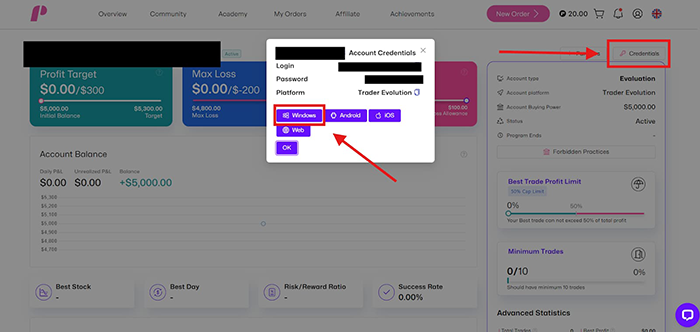
- A pop-up window will appear with several download options: Windows, Android, iOS, and Web.
- Select Web, and you will be directed to the web trading terminal.
Note: If you currently have zero accounts, you will not be able to download the platform from the dashboard.
There are two ways to download the Trade The Pool trading platform app (powered by Trader Evolution).
Option 1: Download through your Trade The Pool Dashboard
- Log in to your Trade The Pool account.
- On your Overview page, select one of your active accounts.
- In the top-right corner, click the Credentials button.
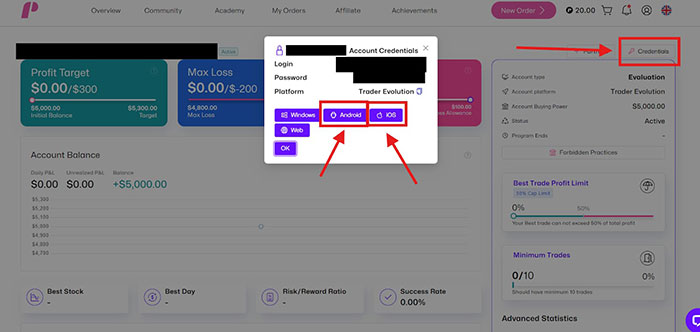
- A pop-up window will appear with several download options: Windows, Android, iOS, and Web.
- Select Android or iOS, depending on your device, and you will be directed to the correct app download page.
Note: If you currently have zero accounts, you will not be able to access the download options on the dashboard. In that case, you must download the app directly from your phone’s app store (see Option 2).
Option 2: Download directly from your phone’s app store
- Open the App Store (iOS) or Google Play Store (Android).
- Search for Trade The Pool.
- The app will appear as a pink icon with a large “P”.
Important Note: Do not search for “Trader Evolution” in your phone’s app store. That will lead you to Trader Evolution’s official app, which is not connected to Trade The Pool and will not work with our system. Always search for Trade The Pool to download the correct app.
Desktop:
- Log in to your Trade The Pool account.
- On your Overview page, select one of your active accounts.
- In the top-right corner, click the Credentials button.
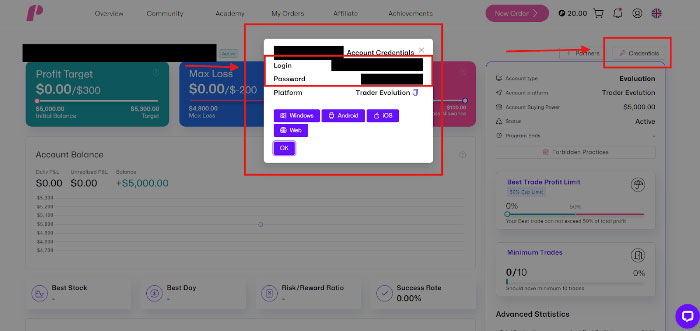
- A pop-up window will appear displaying your log in credentials
- Select the paper icon on the right side of your credentials to copy and paste them to your trading platform.
Phone:
- Open your phone browser of preference.
- Log into your Trade The Pool account.
- On your Overview page, select one of your active accounts.
- In the bottom-right corner, click the Key Icon button.
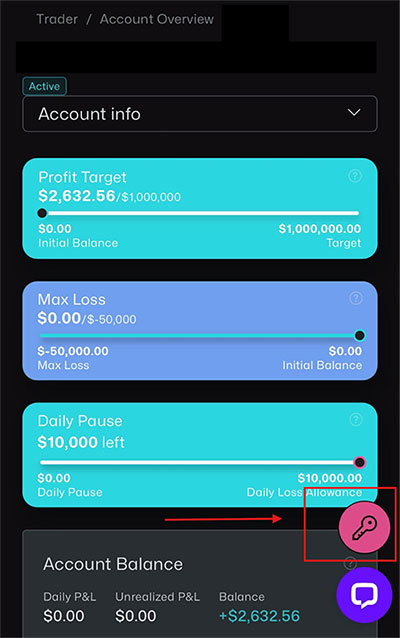
- A pop-up window will appear displaying your log in credentials
- Select the paper icon on the right side of your credentials to copy and paste them to your trading platform.
Note: If you currently have zero accounts, you will not be able to gain access to your credentials from the dashboard.
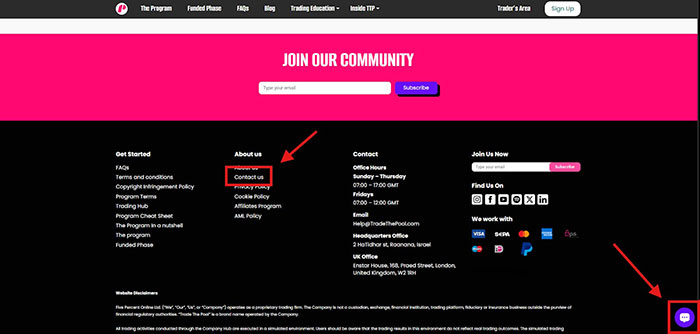
If you need assistance from our support team, there are two primary ways to reach us:
- You can use the live chat option located in the bottom-right corner of the page.
- You can visit our Contact Us page, found at the bottom of the website under the “About Us” section. Clicking this link will take you to a form where you can submit a support ticket.
When a funded account is scaled to the next level, the profit split (70% Customer / 30% TTP) is applied, and the trading credits are added to the new account.
Upon resuming trading in your new scaled funded account (Level 2 and beyond), the added credits will be used first to cover losses below the initial balance of the account.
Any losses beyond the general initial balance will be automatically deducted from these credits. Each time the account balance reaches a new lowest point below the initial balance, the corresponding portion of credits will be reduced.
Profits generated do not replenish or offset lost credits. Instead, profits are counted as new profit and are subject to the applicable profit split.
For more information, head to the program terms.
Once the account has reached 3 x DLs in equity (i.e., “projected balance” including unrealized profits) the max drawdown for the account will move to the initial balance, going below which will result in the account being terminated.
You will be required to complete a KYC (Know Your Customer) verification in the following situations:
- After reaching your first evaluation target – Once you hit the target on your initial evaluation account, you’ll be asked to complete a KYC before moving forward to the account review process.
- When holding multiple evaluation accounts – If you have zero funded accounts but five or more evaluation accounts, you must complete a KYC form before continuing to trade on these accounts.
Additionally, please be aware that TTP may request you to complete a KYC at any time and for any reason during your time with us, regardless of the above scenarios.
For more information regarding the KYC visit our terms and conditions page.
When completing your KYC, please keep the following in mind:
- Once you open the KYC link, you will have 30 minutes to complete the form.
- If your session expires, you will need to contact support to receive a new link.
- Ensure all information is accurate and matches your official identification.
Once you proceed to the next page, you cannot go back. If any errors occur, you will need to request a new link from our support to restart the process.
If you experience any difficulty logging into the trading platform, please contact our support team so we can assist you.
Depending on the nature of the issue, our team may provide you with new platform login credentials.
Note: If new credentials are issued, the login details displayed on your hub dashboard will not update and will remain unchanged. Be sure to keep the email containing your new credentials, as you will need them to access the platform successfully going forward.
If you can’t edit your personal profile information, then congratulations!!
This means your KYC submission has been approved.
Before KYC approval:
You have full access to your personal profile and can make changes as needed.
After KYC approval:
Once your KYC is approved, your profile information is locked for security reasons and you will not be able to make any changes. If you need to update your details, you’ll need to contact our support team to assist.
Trade The Pool offers 24/5 access to US markets. This allows you to trade nearly around the clock, 5 days a week.
- Active Session: Monday 3 a.m. ET – Friday 8 p.m. ET
- Weekends: No weekend session
Swing Trading Accounts: No changes. Open a swing trading account now.
Day Trading Accounts: When trading during Premarket and After-hours sessions (4 p.m. to 9:30 a.m.), your available exposure is reduced to the overnight limits listed below. Open a day trading account now.
Overnight Buying Power:
$5,000 reduced to → $800
$25,000 reduced to → $4,000
$50,000 reduced to → $8,000
$100,000 reduced to → $16,000
$200,000 reduced to → $32,000
With Trade The Pool, news trading is permitted.
In addition, there are earnings‑related conditions for overnight positions, outlined in the program’s official policy on overnight holdings.
All symbols provided by Blue Ocean (around 3,500 tickers).
Important: It is preferable to trade highly liquid stocks to guarantee order fills.
Standard “After-Hours” sessions end at 8:00 p.m. ET. Blue Ocean fills the “gap” from 8:00 p.m. ET until the 4:00 a.m. ET Pre-Market open. It effectively eliminates the period where traders are usually “locked out” of the market.
With 24/5 trading, you gain unmatched flexibility, with the market fitting your schedule, not Wall Street’s. Whether you work a traditional 9‑to‑5 or trade from Sydney, Tokyo, or New York, you get to access the stock market when it’s convenient for you.
Yes. You receive a dedicated real-time data feed from Blue Ocean. You will see live price action, depth, and prints specifically for the overnight session.

Gil is the founder of The5ers & TTP.
He has been a passionate, independent, forex day trader since 2007 and has designed The5ers’ programs based on years of working alongside veteran forex traders.

With B.Sc. in Software Engineering and MBA in Finance & Risk Management, Yaniv is responsible for all the technological and operational aspects at Trade The Pool.
Yaniv is an avid technical analyst, and passionate forex, stocks, and futures trader since 2008.

Tomer is our social network strategic expert with years of hands-on and management experience.

About
Devon began his trading journey in 2017 with a passion for financial markets and problem-solving. He saw trading as a way to uplift his socioeconomic status and quickly grew a strong foundation in risk management. In parallel, Devon has spent 6 years in customer success, helping traders feel supported, confident, and heard—something he takes immense pride in.

Ophira has been building, managing, and promoting websites for over 12 years, ensuring the website is optimized for both users and search engines.
MEET THE TEAM